

FooEvents Seating

$4.99 Free for Members
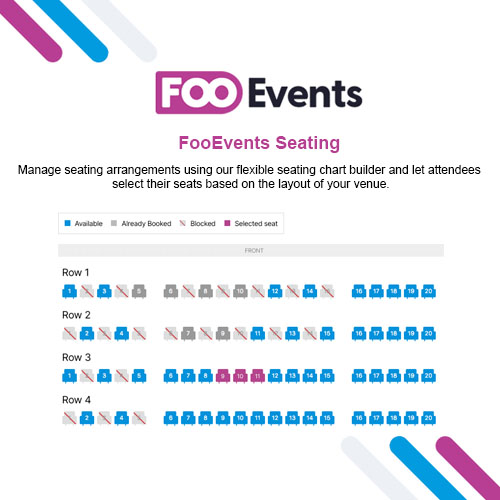
FooEvents Seating is an extension for FooEvents for WooCommerce that lets attendees pick their own reserved seats at checkout. Organizers create seating groups, control availability, and show seat details on tickets.
| Version | 2.0.2 |
|---|---|
| Last Updated | June 30, 2026 |
| Type | WordPress Plugin |
| License | GPL v2 or later |
| Live Demo | View demo → |
100% GPL · Original files · Unlimited sites
- Original, unmodified files — delivered exactly as distributed by the developer
- GPL licensed — use it on unlimited websites, personal or client
- Free updates — new versions appear here as soon as they are released
- Verified downloads — every file is integrity-checked (SHA-256) before release
Distributed under the GNU General Public License. Not affiliated with the original developer; official support, license keys and developer-hosted services (such as one-click updates) are available only from the developer.
Secure checkout with PayPal · GPL licensed · Instant download
Description
FooEvents Seating is an extension for the FooEvents for WooCommerce plugin that adds reserved seat selection to events. Organizers can build seating groups such as rows, tables, or areas, decide which seats can be booked, and link seats to WooCommerce product variations for different pricing. Each attendee's chosen seat appears on their ticket.
Key Features
- Interactive seating charts – Attendees pick their seats from a visual chart while buying tickets, so they can see the layout before choosing.
- Seating groups – Organizers can structure a venue into groups such as rows, tables, or areas.
- Manual seat availability – You decide which individual seats can be booked by marking them available or unavailable.
- Seat details on tickets – The seat a customer chose is shown on their ticket email and attendee record.
- Automatic seat reservation – A purchased seat is tied to the customer's ticket and order, which helps stop the same seat being sold twice.
- Variation-aware layouts – Seating can work with product variations, and the full venue layout can optionally be shown for context.
- Product page seat selection – Seating options appear on the event or product page, and customers must choose seats before checkout.
- Checkout seating chart link – During checkout, customers can open a link to review the seating layout they selected.
Who Is It For
This extension is for event organizers already using FooEvents for WooCommerce who sell reserved seating for venues and shows, such as theatres, conferences, talks, and workshops. It suits events where attendees need assigned seats rather than general admission.







