
WooCommerce Payment Gateway Based Fees

$4.99 Free for Members
Add fees or discounts to WooCommerce orders based on the payment method the customer selects at checkout, with automatic or manual fee handling.
| Version | 5.2.2 |
|---|---|
| Last Updated | April 17, 2026 |
| Type | WordPress Plugin |
| License | GPL v2 or later |
| Live Demo | View demo → |
100% GPL · Original files · Unlimited sites
- Original, unmodified files — delivered exactly as distributed by the developer
- GPL licensed — use it on unlimited websites, personal or client
- Free updates — new versions appear here as soon as they are released
- Verified downloads — every file is integrity-checked (SHA-256) before release
Distributed under the GNU General Public License. Not affiliated with the original developer; official support, license keys and developer-hosted services (such as one-click updates) are available only from the developer.
Secure checkout with PayPal · GPL licensed · Instant download
Description
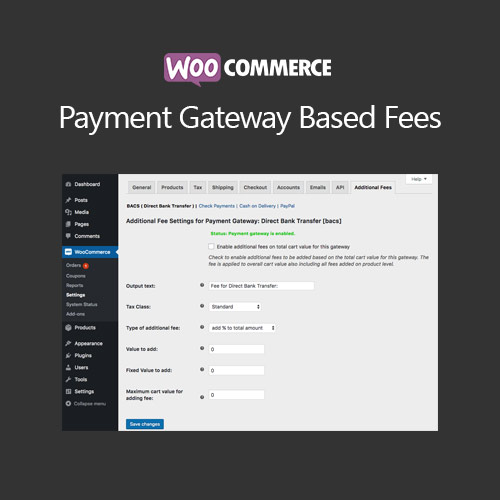
This WooCommerce extension lets store owners attach a fee to an order depending on which payment gateway the shopper chooses. Fees can be calculated automatically from the cart or product price, or added by the shop administrator afterward. Tax calculation for the added fees is supported.
Key Features
- Payment method fees – You can charge an extra amount on an order according to the payment gateway the customer picks.
- Automatic fee calculation – The plugin can work out the fee for you instead of you entering it by hand.
- Manual fee changes – Shop staff can adjust an automatically calculated fee directly on the order screen.
- Fees after checkout – A fee can be added by hand once the customer has already completed checkout, for example when they switch payment methods.
- Admin-created orders – Fees can also be added manually to orders that you create yourself in the admin area.
- Min and max limits – You can set upper and lower boundaries for the fee applied at the cart level.
- Fee calculation methods – Fees can be a flat amount, a percentage added on top of the total, or a percentage taken as commission from the total.
- Tax on fees – Taxes can be calculated for the additional fees you add to orders.
Who Is It For
Store owners running WooCommerce shops who want to pass payment processing costs on to customers or apply different charges per payment method. It suits merchants who need fees calculated automatically from the cart or product price, and who may also want to adjust or add fees manually on orders.