
WooCommerce Variation Swatches Pro

$4.99 Free for Members
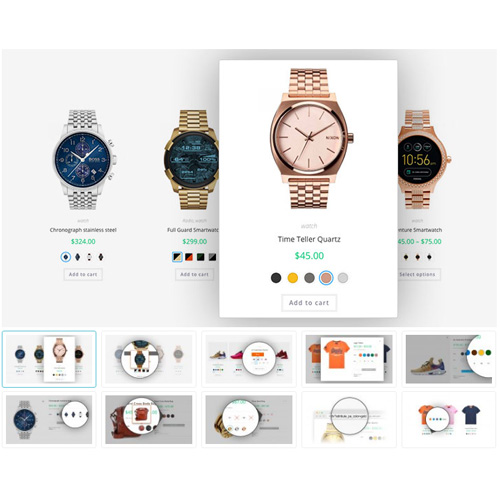
WooCommerce Variation Swatches Pro turns product variation dropdowns into color, image, label, button, and radio swatches, and can also show swatches on shop and archive pages.
| Version | 2.5.1 |
|---|---|
| Last Updated | September 21, 2026 |
| Type | WordPress Plugin |
| License | GPL v2 or later |
| Live Demo | View demo → |
100% GPL · Original files · Unlimited sites
- Original, unmodified files — delivered exactly as distributed by the developer
- GPL licensed — use it on unlimited websites, personal or client
- Free updates — new versions appear here as soon as they are released
- Verified downloads — every file is integrity-checked (SHA-256) before release
Distributed under the GNU General Public License. Not affiliated with the original developer; official support, license keys and developer-hosted services (such as one-click updates) are available only from the developer.
Secure checkout with PayPal · GPL licensed · Instant download
Description
WooCommerce Variation Swatches Pro is a WordPress plugin for WooCommerce stores that replaces standard variation select dropdowns with visual swatch selectors. It supports color, image, label/button, and radio swatches for product attributes, and can display swatches on product pages, catalog/archive pages, and Quick View lightboxes.
Key Features
- Color swatches – Shoppers pick a variation by clicking a color swatch instead of opening a dropdown.
- Image swatches – Variations can be shown as images, which is useful when a color swatch is not enough.
- Button/label swatches – Size, quantity, and other variation details can be displayed as button or label swatches.
- Radio swatches – Variations can also be presented as a radio select list.
- Swatches on archive pages – Swatches can appear on catalog and archive pages, letting customers check variations and add them to the cart from there.
- Image tooltip – On archive pages, an image tooltip can show more detail about a swatch.
- Text tooltip – Instead of an image tooltip, a text tooltip can describe what a swatch represents.
- Dual color swatches – A single variation can display two colors together.
Who Is It For
This plugin is for WooCommerce store owners who sell variable products and want customers to choose attributes through visual swatches rather than dropdown menus. It suits shops that want variation selection available on product pages, catalog/archive pages, and Quick View lightboxes.