
Pwork – Intranet For WordPress
$4.99 Free for Members
Pwork turns a WordPress site into a private, self-hosted intranet where teams manage projects, tasks, files, events, discussions and news in one isolated workspace.
| Version | 3.1.1 |
|---|---|
| Last Updated | October 23, 2026 |
| Type | WordPress Plugin |
| License | GPL v2 or later |
| Live Demo | View demo → |
100% GPL · Original files · Unlimited sites
- Original, unmodified files — delivered exactly as distributed by the developer
- GPL licensed — use it on unlimited websites, personal or client
- Free updates — new versions appear here as soon as they are released
- Verified downloads — every file is integrity-checked (SHA-256) before release
Distributed under the GNU General Public License. Not affiliated with the original developer; official support, license keys and developer-hosted services (such as one-click updates) are available only from the developer.
Secure checkout with PayPal · GPL licensed · Instant download
Description
Pwork is a self-hosted WordPress intranet plugin that gives a team its own private portal, separate from the public theme. It bundles project boards, tasks, a file library, an events calendar, a forum, news, direct messaging, a knowledge base and a staff directory. Access is controlled by roles, and the plugin works independently of the active theme.
Key Features
- Kanban project boards – Teams plan work on drag-and-drop boards and move cards through workflow stages they define themselves.
- Task checklists and alerts – Projects can be broken into checklist items with progress bars, and assigned members are notified by email.
- File library – Documents are kept in folders with role-based access, and members can search titles, descriptions and file names.
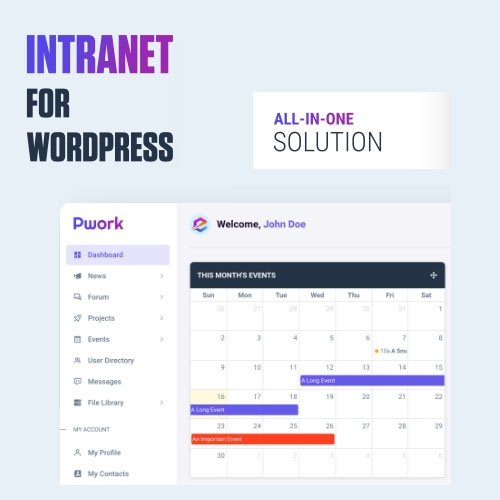
- Events calendar – Company events appear in monthly and weekly views, with start and end times, organizer details and reminders.
- Discussion forum – Conversations are grouped into categories and support nested replies, attachments and moderation by authors and administrators.
- News and announcements – Admins publish formatted updates, pin important notices to the dashboard and email the team when something is posted.
- User directory – A searchable staff list shows profiles with contact details, biography, join date and last-active status.
- Isolated app environment – The intranet runs on its own URL endpoint, apart from the public theme, with a navbar, sidebar and customizable dashboard widgets.
Who Is It For
It suits businesses and organizations that want an internal employee portal on their own WordPress installation rather than a per-seat external service. Teams, departments and clients can use it for projects, documents, discussions and company news in one private space.