
Product Variations Table for WooCommerce

$4.99 Free for Members
A WooCommerce plugin that shows variable product options in a table or list instead of the default dropdown, with quantity fields and bulk add-to-cart.
| Version | 1.4.0 |
|---|---|
| Last Updated | August 4, 2026 |
| Type | WordPress Plugin |
| License | GPL v2 or later |
| Live Demo | View demo → |
100% GPL · Original files · Unlimited sites
- Original, unmodified files — delivered exactly as distributed by the developer
- GPL licensed — use it on unlimited websites, personal or client
- Free updates — new versions appear here as soon as they are released
- Verified downloads — every file is integrity-checked (SHA-256) before release
Distributed under the GNU General Public License. Not affiliated with the original developer; official support, license keys and developer-hosted services (such as one-click updates) are available only from the developer.
Secure checkout with PayPal · GPL licensed · Instant download
Description
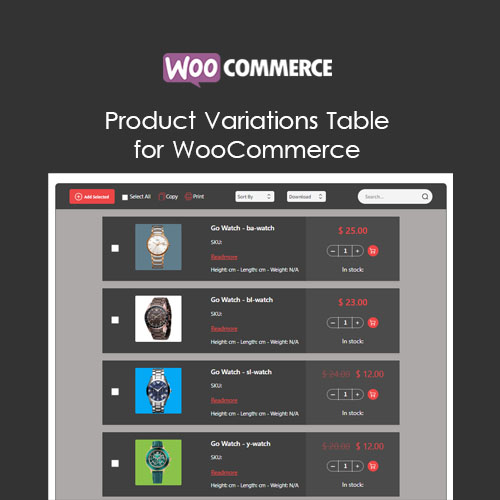
Product Variations Table for WooCommerce replaces the standard variation dropdown with a table or list layout. Shoppers can browse variations, search them, and add several to the cart at once. Columns, colors, and where the table appears are configurable.
Key Features
- Table or list view – Variations are shown in a table or list layout rather than the usual dropdown selector.
- Custom table columns – You decide which details appear as columns, such as image, SKU, price, stock, or quantity.
- Bulk add to cart – Customers can select several variations and quantities and place them in the cart in one action.
- Ajax search filter – A search bar narrows the listed variations as the shopper types, without reloading the page.
- Export and print – The variation list can be printed, copied, or downloaded as PDF, CSV, or Excel.
- Targeting by product or role – You can limit the table to chosen products, categories, or user roles.
- Shortcode placement – A shortcode lets you drop the variation table into builders such as Elementor and Divi.
Who Is It For
It suits WooCommerce store owners selling variable products, particularly B2B and wholesale shops where buyers order several variations at once. It also helps any store that wants variations visible in a table instead of hidden in a dropdown.