

WP OS Desktop Backend – More than a WordPress Admin Theme
$4.99 Free for Members
A WordPress plugin that turns the admin dashboard into a desktop-style interface, with draggable windows, a taskbar, and desktop icons.
| Version | 1.160 |
|---|---|
| Last Updated | May 21, 2023 |
| Type | WordPress Plugin |
| License | GPL v2 or later |
| Live Demo | View demo → |
100% GPL · Original files · Unlimited sites
- Original, unmodified files — delivered exactly as distributed by the developer
- GPL licensed — use it on unlimited websites, personal or client
- Free updates — new versions appear here as soon as they are released
- Verified downloads — every file is integrity-checked (SHA-256) before release
Distributed under the GNU General Public License. Not affiliated with the original developer; official support, license keys and developer-hosted services (such as one-click updates) are available only from the developer.
Secure checkout with PayPal · GPL licensed · Instant download
Description
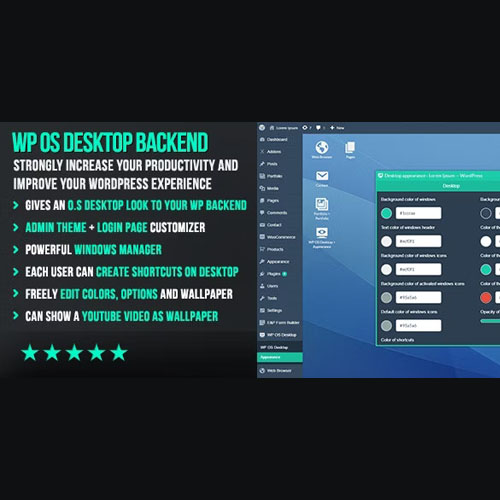
WP OS Desktop Backend is a WordPress plugin that replaces the standard admin dashboard with a desktop-style operating system interface. Instead of the usual admin layout, you get draggable windows, a taskbar, and desktop icons, so managing a WordPress site feels like using a familiar desktop computer.
Key Features
- Desktop-style admin interface – The plugin reshapes the WordPress admin dashboard into an interface that resembles a desktop operating system.
- Draggable windows – Admin screens appear as windows you can move around the screen by dragging them.
- Taskbar – A taskbar gives you a persistent bar for switching between and managing open admin windows.
- Desktop icons – Admin areas are represented as icons placed on the desktop surface.
- Familiar desktop experience – Working in WordPress administration follows the conventions of desktop computing rather than a typical web admin panel.
Who Is It For
This plugin is aimed at WordPress site owners, administrators, and developers who want a different way to work in the admin area and are comfortable with desktop-style interfaces. It suits people who manage their sites through the WordPress dashboard and prefer windows, a taskbar, and icons over the default admin layout.







