
WooCommerce Paymill Gateway

$4.99 Free for Members
A WooCommerce extension that lets your store accept payments through Paymill’s API, with checkout settings for title, description, and test or live mode.
| Version | 3.3.0 |
|---|---|
| Last Updated | January 24, 2017 |
| Type | WordPress Plugin |
| License | GPL v2 or later |
| Live Demo | View demo → |
100% GPL · Original files · Unlimited sites
- Original, unmodified files — delivered exactly as distributed by the developer
- GPL licensed — use it on unlimited websites, personal or client
- Free updates — new versions appear here as soon as they are released
- Verified downloads — every file is integrity-checked (SHA-256) before release
Distributed under the GNU General Public License. Not affiliated with the original developer; official support, license keys and developer-hosted services (such as one-click updates) are available only from the developer.
Secure checkout with PayPal · GPL licensed · Instant download
Description
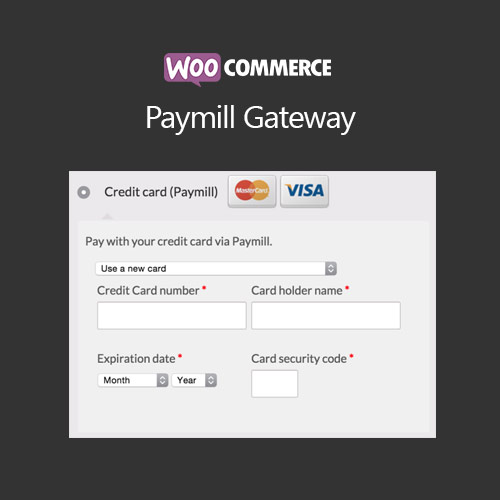
WooCommerce Paymill Gateway is a WordPress plugin that connects your WooCommerce store to the Paymill payment platform so payments are taken directly on your site through Paymill's API. After entering your Paymill API keys, the payment method appears at checkout, where you can set the title and description customers see and switch between test and live transactions.
Key Features
- Payments via Paymill API – Payments are processed on your store through Paymill's API rather than sending shoppers elsewhere.
- Checkout title and description – You can edit the payment method's title and description as they appear to customers during checkout.
- Test or live mode – A setting lets you choose whether transactions run in test mode or as live transactions.
- Paymill API keys required – You must enter your public and private Paymill API keys before the payment method becomes available at checkout.
- Method appears at checkout – Once the keys are saved, the Paymill payment method shows up as an option during checkout.
- SSL certificate needed – An SSL certificate is listed among the requirements for using the gateway.
- Paymill account needed – You need a Paymill account, and API keys are found under My Account > Settings > API Keys.
- Country and currency limits – The method stays hidden if your country or currency is not supported by Paymill.
Who Is It For
This plugin is for WooCommerce store owners who already use Paymill and want to accept payments through it directly on their site. It suits merchants in countries and currencies that Paymill supports, and the documentation notes the product is no longer available on WooCommerce.com and is kept for existing users.