
WooCommerce Nested Category Layout

$4.99 Free for Members
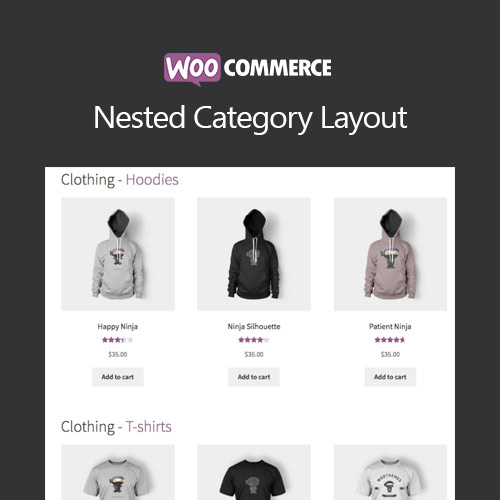
Display WooCommerce products grouped by subcategory on shop and catalog pages, so shoppers browse a nested category layout instead of clicking through category levels.
| Version | 1.20.3 |
|---|---|
| Last Updated | June 18, 2026 |
| Type | WordPress Plugin |
| License | GPL v2 or later |
| Live Demo | View demo → |
100% GPL · Original files · Unlimited sites
- Original, unmodified files — delivered exactly as distributed by the developer
- GPL licensed — use it on unlimited websites, personal or client
- Free updates — new versions appear here as soon as they are released
- Verified downloads — every file is integrity-checked (SHA-256) before release
Distributed under the GNU General Public License. Not affiliated with the original developer; official support, license keys and developer-hosted services (such as one-click updates) are available only from the developer.
Secure checkout with PayPal · GPL licensed · Instant download
Description
WooCommerce Nested Category Layout is a plugin that organizes products by category and subcategory on shop and catalog pages. You choose which category pages get this layout and how many products appear per subcategory, while other pages render normally.
Key Features
- Grouped subcategory display – Products are listed under their subcategory headings on the shop and catalog pages, so shoppers see the catalog structure at a glance.
- Selective page layout – You decide which category pages use the nested layout and which keep the standard WooCommerce rendering.
- Products per subcategory – A setting controls how many products are shown under each subcategory on shop and catalog pages.
- Shop or category pages – You can apply the layout to both shop and category pages, or limit it to category pages only.
- Uncategorized products on top – Products without a category are placed at the top of the page, above the category and subcategory listings.
- Parent and subcategory handling – A product that belongs to both a parent category and a subcategory appears under the subcategory, while products only in a parent category show in the parent section before subcategories.
- Theme compatibility – The plugin is known to work with WooCommerce themes and the Genesis Framework, and its architecture can be overridden for other themes.
- Clickable category titles – Shoppers can click a category or subcategory title to open the full listing of products in that section.
Who Is It For
This plugin suits WooCommerce store owners whose catalogs have deep category and subcategory structures, and who want shoppers to browse products by subcategory directly on shop and catalog pages. It is also relevant for stores using WooCommerce themes or the Genesis Framework that need a more organized catalog view.