
WooCommerce Easy Checkout Field Editor
$4.99 Free for Members
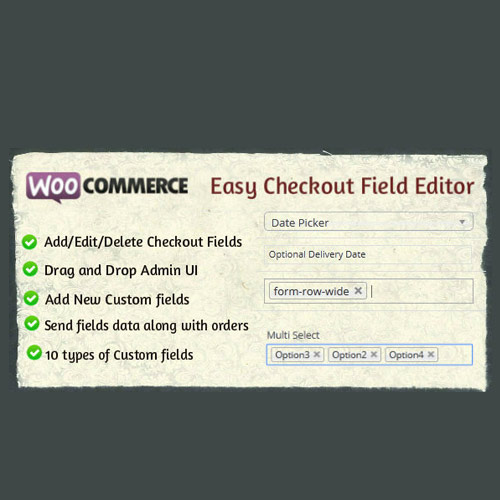
A WooCommerce plugin for managing checkout form fields. Add, remove, edit, and reorder fields through a drag-and-drop interface.
| Version | 3.8.0 |
|---|---|
| Last Updated | September 22, 2025 |
| Type | WordPress Plugin |
| License | GPL v2 or later |
| Live Demo | View demo → |
100% GPL · Original files · Unlimited sites
- Original, unmodified files — delivered exactly as distributed by the developer
- GPL licensed — use it on unlimited websites, personal or client
- Free updates — new versions appear here as soon as they are released
- Verified downloads — every file is integrity-checked (SHA-256) before release
Distributed under the GNU General Public License. Not affiliated with the original developer; official support, license keys and developer-hosted services (such as one-click updates) are available only from the developer.
Secure checkout with PayPal · GPL licensed · Instant download
Description
WooCommerce Easy Checkout Field Editor is a WordPress plugin that gives you control over the fields shown on your WooCommerce checkout form. You can add new fields, remove existing ones, edit them, and change their order using a drag-and-drop interface. It also supports custom field types, conditional display logic, field validation, and section management.
Key Features
- Drag-and-Drop Field Ordering – Rearrange checkout fields by dragging them into the order you want, without touching code.
- Custom Field Types – Choose from custom field types when building out your checkout form.
- Conditional Display Logic – Control when a field appears based on conditions you set.
- Field Validation – Apply validation rules to the fields on your checkout form.
- Section Management – Organize checkout fields into sections for a tidier form layout.
Who Is It For
This plugin is for WooCommerce store owners and WordPress site builders who want to tailor the checkout form without writing code. It suits anyone who needs to add, remove, edit, or reorder checkout fields to match how their store collects customer information.