
WooCommerce Chase Paymentech

$4.99 Free for Members
WooCommerce Chase Paymentech connects your store to Chase payment processing, letting customers pay by major card while staying on your site. It supports saved cards, refunds, and capturing authorized charges from WooCommerce.
| Version | 1.19.3 |
|---|---|
| Last Updated | August 22, 2026 |
| Type | WordPress Plugin |
| License | GPL v2 or later |
| Live Demo | View demo → |
100% GPL · Original files · Unlimited sites
- Original, unmodified files — delivered exactly as distributed by the developer
- GPL licensed — use it on unlimited websites, personal or client
- Free updates — new versions appear here as soon as they are released
- Verified downloads — every file is integrity-checked (SHA-256) before release
Distributed under the GNU General Public License. Not affiliated with the original developer; official support, license keys and developer-hosted services (such as one-click updates) are available only from the developer.
Secure checkout with PayPal · GPL licensed · Instant download
Description
WooCommerce Chase Paymentech is a payment gateway extension that connects your WooCommerce store to Chase Payment Solutions. It accepts major credit and debit cards through Chase's Hosted Pay Page, so card data is handled on Chase's servers while shoppers stay on your site. Store staff can also process refunds and capture authorized charges from the WooCommerce admin.
Key Features
- Major card acceptance – Shoppers can pay with Visa, MasterCard, American Express, Discover, UnionPay, and JCB cards.
- Hosted Pay Page security – Payments are posted to Chase's secure servers while the customer appears to remain on your site, which reduces your PCI compliance scope.
- Saved payment methods – Customers can store multiple cards on their account, choose a default, and remove them from the My Account page.
- Add cards without checkout – Customers can add a new payment method from their account page without placing an order first.
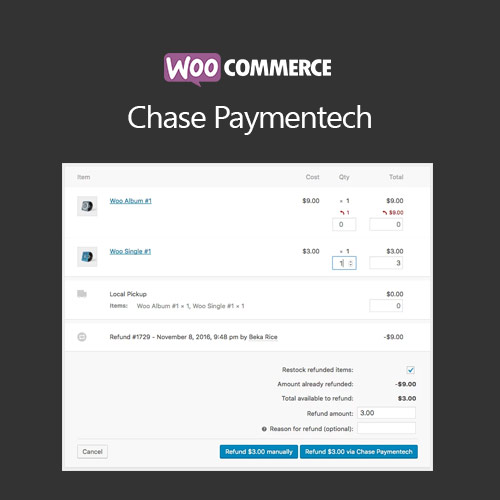
- Refunds and voids – Staff can issue full or partial refunds from the Edit Order screen, and uncaptured transactions are voided automatically.
- Capture authorized charges – If you set the gateway to authorize only, you can capture the funds later from the WooCommerce order screen instead of the Chase control panel.
- Subscriptions support – The gateway works with WooCommerce Subscriptions, including payment date and subscription date changes.
- Pre-Orders support – It also works with WooCommerce Pre-Orders, taking payment details upfront and charging them when the pre-order is released.
Who Is It For
This extension is for WooCommerce store owners who use Chase Payment Solutions as their payment processor and want to accept cards on their own site. It suits shops selling physical or virtual goods, including those running subscriptions or pre-orders, and businesses that prefer to manage refunds and captures from the WooCommerce dashboard.