
WooCommerce Cart Notices

$4.99 Free for Members
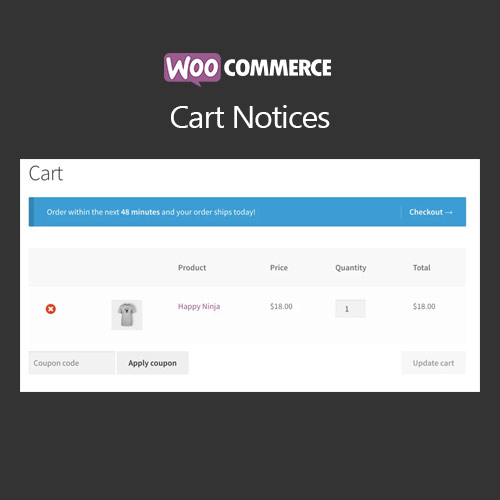
WooCommerce Cart Notices shows dynamic messages on the cart and checkout pages, and shortcodes let you place notices elsewhere on your site.
| Version | 1.16.5 |
|---|---|
| Last Updated | August 13, 2026 |
| Type | WordPress Plugin |
| License | GPL v2 or later |
| Live Demo | View demo → |
100% GPL · Original files · Unlimited sites
- Original, unmodified files — delivered exactly as distributed by the developer
- GPL licensed — use it on unlimited websites, personal or client
- Free updates — new versions appear here as soon as they are released
- Verified downloads — every file is integrity-checked (SHA-256) before release
Distributed under the GNU General Public License. Not affiliated with the original developer; official support, license keys and developer-hosted services (such as one-click updates) are available only from the developer.
Secure checkout with PayPal · GPL licensed · Instant download
Description
WooCommerce Cart Notices is a WooCommerce plugin that displays dynamic, actionable messages to customers as they check out. You can create notices based on the cart amount, a deadline, the referring site, or the products and categories in the cart. Notices can also be placed anywhere shortcodes are allowed.
Key Features
- Cart and checkout messages – Notices appear directly on the cart and checkout pages while the customer is reviewing an order.
- Shortcode placement – The same notices can be inserted elsewhere on your site wherever shortcodes are supported, such as the top of a shop or category page.
- Dynamic message variables – Messages can include variables that fill in live values, such as the remaining amount a customer must add to reach a free-shipping minimum.
- Call to action button – A notice can include a button or link that points customers toward the action you want them to take.
- Five notice types – You can build notices around the current order amount, a deadline, the referer, the products in the cart, or the categories in the cart.
- Quantity-based discounts – The Product in Cart notice can set minimum and maximum quantities that determine when a discount applies.
- Single management menu – All notices are created and managed from one menu, where you can view, edit, or disable them.
Who Is It For
This plugin is for WooCommerce store owners who want to promote offers, cross-sells, and spending thresholds through messages on the cart and checkout pages, or elsewhere on the site via shortcodes.