
Customer Switching for WooCommerce

$4.99 Free for Members
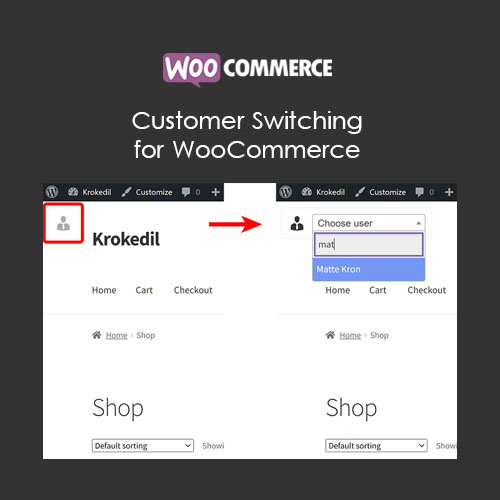
Customer Switching for WooCommerce lets admins and store managers act on behalf of customers from the front end. Switch between user accounts to manage orders and test the store as a customer.
| Version | 2.1.3 |
|---|---|
| Last Updated | June 20, 2026 |
| Type | WordPress Plugin |
| License | GPL v2 or later |
| Live Demo | View demo → |
100% GPL · Original files · Unlimited sites
- Original, unmodified files — delivered exactly as distributed by the developer
- GPL licensed — use it on unlimited websites, personal or client
- Free updates — new versions appear here as soon as they are released
- Verified downloads — every file is integrity-checked (SHA-256) before release
Distributed under the GNU General Public License. Not affiliated with the original developer; official support, license keys and developer-hosted services (such as one-click updates) are available only from the developer.
Secure checkout with PayPal · GPL licensed · Instant download
Description
Customer Switching for WooCommerce is a front-end tool that lets admins and store managers act as a customer in the store. It allows switching between user accounts so you can view and use the shop as that customer. It is useful for troubleshooting, testing, and handling orders on a customer's behalf.
Key Features
- Act as customer – Admins and store managers can switch into a customer account and use the store as that person.
- Front-end switching tool – The switching control appears on the front end of the site, so you can change accounts while browsing the shop.
- Search for users – From the switching tool you can look up the user you want to switch to.
- Create orders for customers – While acting as a customer you can add items to the cart and place an order on their behalf.
- Capability-based security – A user can only switch to accounts with the same or lower capabilities, limiting who can be accessed.
- Nonce protection – Switching actions are protected by WordPress nonces, so only intentional switches are carried out.
- Switch-back reminder – After switching, a message reminds you that you are logged in as another user, with a link to return to your own account.
Who Is It For
This plugin is for WooCommerce store owners, administrators, and store managers who need to view or operate the shop as a customer. It suits teams that handle phone orders, troubleshoot customer issues, or test store behavior without asking for passwords.