
WooCommerce Slack

$4.99 Free for Members
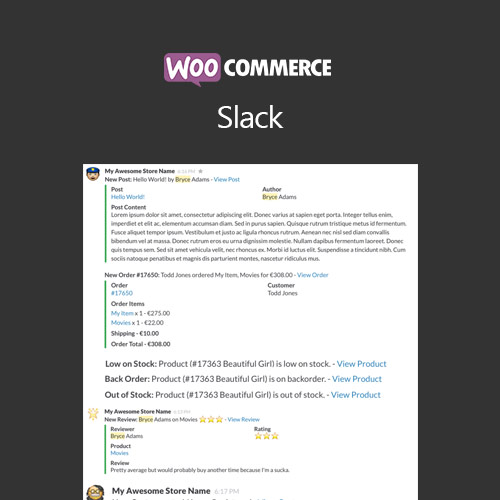
WooCommerce Slack posts real-time store notifications into your Slack channels, covering new orders, stock changes, refunds, reviews, and customer registrations.
| Version | 1.8.0 |
|---|---|
| Last Updated | October 3, 2025 |
| Type | WordPress Plugin |
| License | GPL v2 or later |
| Live Demo | View demo → |
100% GPL · Original files · Unlimited sites
- Original, unmodified files — delivered exactly as distributed by the developer
- GPL licensed — use it on unlimited websites, personal or client
- Free updates — new versions appear here as soon as they are released
- Verified downloads — every file is integrity-checked (SHA-256) before release
Distributed under the GNU General Public License. Not affiliated with the original developer; official support, license keys and developer-hosted services (such as one-click updates) are available only from the developer.
Secure checkout with PayPal · GPL licensed · Instant download
Description
WooCommerce Slack is a WordPress plugin that sends WooCommerce store events into your team's Slack channels as they happen. It covers ten event types, including new orders, order status updates, refunds, stock alerts, reviews, and new customers. Each event can be routed to its own channel with its own emoji, sender name, and message template.
Key Features
- Real-time store notifications – Store events are posted to your Slack channels the moment they occur, so your team does not have to watch the WordPress dashboard.
- Ten event types – You can switch on notifications for new orders, order status updates, subscription renewals, refunds, back orders, low stock, out of stock, new reviews, new customers, and new posts.
- Per-event channel routing – Each event type can be sent to one or more Slack channels, so sales, operations, and finance each see what concerns them.
- Custom message templates – Notifications are built from tokens such as {order_number} and {product_name}, and Slack markup can link back to the order, product, or customer.
- Extended notifications – You can attach richer detail to a message, including line items, product thumbnails, and timestamps, and set the detail level per event.
- Order status tracking – The order-status event fires when an order changes to any status you select, including custom statuses your store uses.
- Stock threshold alerts – Low-stock, out-of-stock, and back-order events notify a channel when inventory crosses the thresholds already set in WooCommerce.
- Checkout compatibility – New-order notifications fire on both the classic checkout and the WooCommerce checkout block.
Who Is It For
This plugin is for WooCommerce store owners and teams who already work in Slack and want order, stock, refund, and customer activity delivered there instead of checking wp-admin. It suits shops where sales, operations, and finance need to see different events without sharing one noisy feed.