
WooCommerce Bulk Stock Management

$4.99 Free for Members
A WooCommerce extension that adds a stock-focused admin screen where you can set quantities for many products and variations at once, apply stock status bulk actions, and print a stock report.
| Version | 2.3.8 |
|---|---|
| Last Updated | September 28, 2026 |
| Type | WordPress Plugin |
| License | GPL v2 or later |
| Live Demo | View demo → |
100% GPL · Original files · Unlimited sites
- Original, unmodified files — delivered exactly as distributed by the developer
- GPL licensed — use it on unlimited websites, personal or client
- Free updates — new versions appear here as soon as they are released
- Verified downloads — every file is integrity-checked (SHA-256) before release
Distributed under the GNU General Public License. Not affiliated with the original developer; official support, license keys and developer-hosted services (such as one-click updates) are available only from the developer.
Secure checkout with PayPal · GPL licensed · Instant download
Description
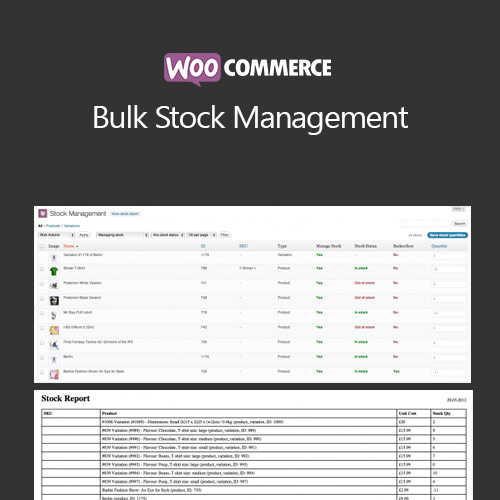
Bulk Stock Management for WooCommerce is an inventory extension that adds a dedicated screen under Products > Stock Management. It lists your products and variations with their stock properties so you can update quantities and stock status in bulk instead of opening each product page. It also generates a printable stock report.
Key Features
- Dedicated stock screen – A separate admin screen lists your products and variations together with their stock properties.
- Bulk quantity editing – An input field at the end of each row lets you set stock quantities for several products in one view.
- Stock status bulk actions – Select products with checkboxes and apply bulk actions that change their stock status.
- Backorder bulk actions – Backorder rules can be applied to many products or variations at the same time.
- Variation stock editing – Variations appear in the same list, so you can view and update stock for individual variations there.
- Filtering and sorting – You can narrow the list by product type, stock management status, stock status and category, and order it by name, ID, SKU or stock quantity.
- Printable stock report – A View stock report button produces a printable report of stock levels, with each product and variation on its own line.
Who Is It For
This WooCommerce inventory extension suits store owners who manage stock across many products or variations and want to set quantities, change stock status and backorder rules, and print stock reports from one screen. It fits catalogs with frequent restocks or stock takes, and stores selling items in multiple sizes or options.