
WooCommerce Customer/Order/Coupon CSV Import Suite

$4.99 Free for Members
Import customers, orders, and coupons into WooCommerce from CSV files. Map your columns, merge or create records, and run large imports in the background.
| Version | 3.12.7 |
|---|---|
| Last Updated | September 3, 2026 |
| Type | WordPress Plugin |
| License | GPL v2 or later |
| Live Demo | View demo → |
100% GPL · Original files · Unlimited sites
- Original, unmodified files — delivered exactly as distributed by the developer
- GPL licensed — use it on unlimited websites, personal or client
- Free updates — new versions appear here as soon as they are released
- Verified downloads — every file is integrity-checked (SHA-256) before release
Distributed under the GNU General Public License. Not affiliated with the original developer; official support, license keys and developer-hosted services (such as one-click updates) are available only from the developer.
Secure checkout with PayPal · GPL licensed · Instant download
Description
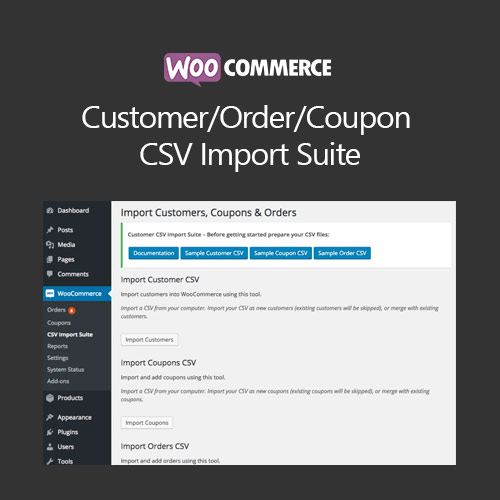
This WooCommerce plugin brings customer records, order history, and coupon codes into your store from CSV files. You can map your file's columns to WooCommerce data and choose whether matching records are updated or new ones are created. It is built for moving data from another platform or managing bulk changes.
Key Features
- CSV customer import – Bring customer details such as name, email, and addresses into WooCommerce from a CSV file.
- CSV order import – Load order records including line items, linked customers, totals, notes, and order numbers.
- CSV coupon import – Create coupons from a CSV file with all coupon fields supported.
- Merge existing records – Update existing customers, coupons, or orders when imported rows match them instead of only creating new entries.
- Column mapping – Match the columns in your file to the corresponding WooCommerce fields so different file formats can be used.
- Multiple import sources – Provide data by uploading a file, pointing to a URL or file path, or pasting it directly.
- Background processing – Large imports run in the background so you can leave the import page while they finish.
- Dry run preview – Test an import before committing it, then see how many rows were inserted, modified, or skipped.
Who Is It For
Store owners and developers who need to move customers, orders, and coupons from another eCommerce platform into WooCommerce, or who manage bulk updates to existing records. It suits shops handling large data sets that would be impractical to enter by hand.